
Understanding Data Flow in Web Applications
Understanding Data Flow in Web Applications
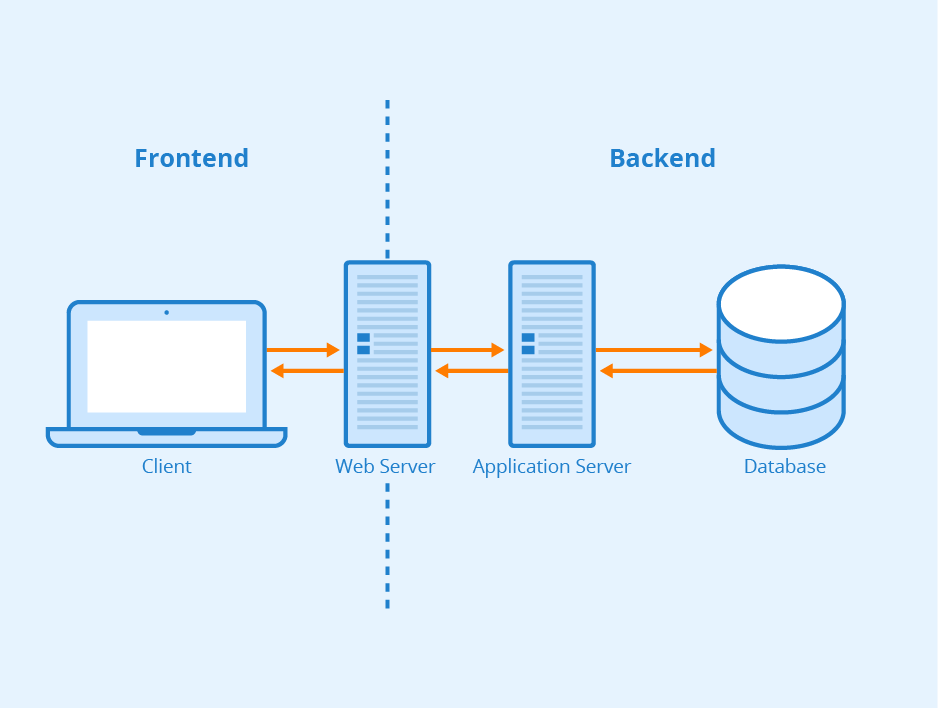
In software development, especially in web applications, the flow of data between the frontend and backend is crucial. Many developers often find themselves stuck, trying to identify where issues arise—especially when saving or fetching records from the database. This guide will explore the data lifecycle across programming languages, offering practical steps and debugging tips to help you troubleshoot common real-life challenges.
Step 1: Data Submission from the Frontend
The process begins when a user interacts with the frontend, often by filling out a form. For instance, think about a user trying to sign up for a service.
- User Interaction: Users input their details, like name and email.
- Data Transmission: This data is sent to the server via an HTTP request.
Common Debugging Tips:
- Inspect Network Requests: Use browser developer tools to verify the request URL, method (GET, POST, etc.), and payload.
- Log Data: Before the request, log the data being sent to ensure it’s formatted correctly. This can prevent issues like missing fields or incorrect data types.
Step 2: Data Reception at the Backend
Once the request reaches the server, it needs to be routed to the correct endpoint. Imagine a scenario where users are trying to register, but they receive an error message instead.
- Routing: The backend framework directs the request to the appropriate handler.
Common Debugging Tips:
- Check Route Definitions: Ensure your routes match incoming requests accurately, as this can prevent users from accessing the right functionality.
- Log Incoming Requests: Use logging to capture incoming requests for verification. This can help identify if the server is receiving the expected data.
Step 3: Handling Data in Controllers
The controller processes the request, applying business logic. Picture this as a customer service representative validating the information before creating a new account.
- Data Processing: This is where the data is validated and prepared for storage.
Common Debugging Tips:
- Validate Input: Log validation errors to understand potential issues, such as users providing invalid emails or missing required fields.
- Debug Logic: Use logging statements to track the flow of data through your controller. This helps pinpoint where things might go wrong.
Step 4: Interacting with Models
After processing, the controller often calls model methods to interact with the database. Imagine a situation where users complain about missing records after registration.
- Database Interaction: Models represent data structures and handle database operations.
Common Debugging Tips:
- Check Model Methods: Ensure methods are correctly implemented and returning the expected results. Misconfigured methods can lead to data not being saved properly.
- Review Database Logs: Look into database logs to track query execution and errors, which can help identify issues with saving or retrieving data.
Step 5: Sending Data Back to the Frontend
Once the backend processes the request, it prepares a response. Consider a scenario where the registration is successful, but the user doesn’t see a confirmation message.
- Response Creation: The backend constructs a response (often in JSON format) and sends it back to the frontend.
Common Debugging Tips:
- Inspect Response Format: Verify that the response is correctly formatted. A malformed response can break the frontend.
- Check Status Codes: Ensure appropriate HTTP status codes are being sent, as this informs the frontend about the result of the operation.
Step 6: Handling the Response on the Frontend
After receiving the response, the frontend processes it accordingly. Imagine a user eagerly awaiting confirmation of their signup, but nothing happens.
- Data Reception: The frontend awaits the response and processes it upon arrival.
- Response Handling: It updates the UI based on the data received.
Common Debugging Tips:
- Use Network Monitoring: Inspect the response data to ensure it matches expectations. Look for potential errors or unexpected data.
- Log Incoming Data: Track the data received to ensure proper handling and display.
Step 7: Updating the User Interface
Once the response is processed, the frontend updates the UI. Picture a dashboard displaying the newly registered user’s information.
- DOM Manipulation: The frontend modifies the interface to reflect the new data.
Common Debugging Tips:
- Verify UI Changes: Ensure that the UI updates correctly based on the received data. This can involve checking that new entries appear as expected.
- Check for Errors: Look for JavaScript or frontend errors that might prevent proper rendering of new data.
Step 8: Error Handling and User Feedback
Effective error handling is crucial for maintaining a good user experience. Imagine users encountering issues but receiving no feedback on what went wrong.
- Error Management: If the backend returns an error, the frontend should provide appropriate feedback to the user.
Common Debugging Tips:
- Implement Error States: Ensure the frontend handles errors gracefully and informs users about any issues.
- Log Errors: Capture and log any errors for troubleshooting to improve the user experience in the future.
Conclusion
By understanding the full data flow from the frontend to the backend and back, you can more effectively debug issues and enhance your applications. This knowledge is crucial in overcoming real-life challenges, especially when dealing with data-saving and retrieval issues. Utilize the outlined steps and debugging tips to trace data and maintain a seamless user experience. Attention to detail in data handling and error management is key to building successful applications.

